The Empty-Room Myth: Why Switching Things Off Is Not the Whole Story
Standby energy use varies by appliance. Learn how to judge its purpose, check its settings and decide whether a device can be switched off safely.
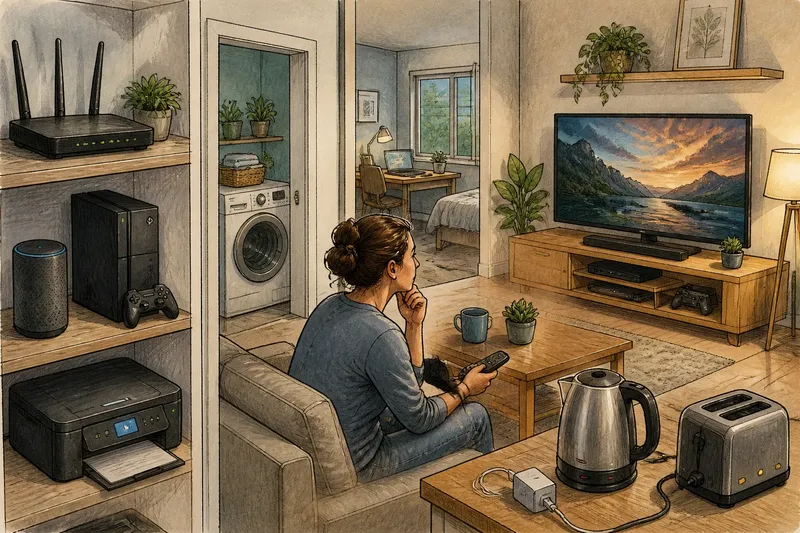
Standby energy use depends on what an appliance is doing, not on whether anyone is in the room. A router in a spare room may keep the whole home connected, while a television in a busy sitting room may simply be waiting for a remote command.
Separate an appliance’s purpose from its location. Then decide whether its active operation or standby function is useful, and whether switching it off would interrupt a service you rely on.
What does standby energy use mean?
Active use is when an appliance performs its main task: a television shows a programme, a computer processes work or a washing machine runs a cycle. Its demand can change as the task changes.
Standby means the appliance is not doing its main job but remains ready, connected or responsive. It may listen for a remote-control command, maintain a network connection, display a clock or keep settings in memory. Some appliances also use energy while idle without appearing fully switched off.
Off can mean different things. Switching an appliance off at its own control may leave it connected to the supply. Disconnecting it prevents power flowing through that connection, but is not suitable for every device. Check the manual and identify what the appliance needs to maintain before cutting power.
An indicator light can help you identify a state, but it does not show how much energy the appliance uses. Do not judge demand by appearance alone.
How should you judge standby by purpose and location?
Ask what service an appliance provides while idle. A smart speaker may need to hear a wake command; a router may connect devices throughout the home; a printer may be ready for a job. Those functions have different value in different households.
Location is a separate question. A connected appliance in an empty room can still serve people elsewhere, and a device in a busy room can spend much of the day idle. Judge the task and operating state, not simply whether someone is nearby.
For example, imagine a household has a router on a shelf in a spare room and a television in the sitting room. The router supports a laptop elsewhere in the home, so its location does not make its service unnecessary; the television is idle between programmes, so its owner checks whether quick-start is useful. The resulting decisions are to leave the router connected and change the television’s setting only if a slower start is acceptable.
Check what the device does before deciding what its room suggests.
Which appliances should you review first?
Start with appliances that run for long periods or do substantial work while active. A dryer heating and turning a load raises a different question from a charger left plugged in after charging. First ask whether the appliance needs to be running; then ask whether its standby function is useful.
- Network equipment: Check whether a router or mesh unit supports internet access or remote services elsewhere in the home. If something depends on it, keep it connected; if not, check the router’s instructions before deciding whether to switch it off.
- Entertainment devices: Check whether a television, games console or streaming box uses quick-start or background updates. If instant access or updates matter, retain the relevant setting; if they do not, choose a deeper sleep setting and accept a slower start.
- Computers and monitors: Check whether the computer has unsaved work or tasks still running. If it does, leave it active or save and finish the task first; if it does not, use sleep or shut down according to when you will need it again.
- Chargers: Check whether a device is still charging and whether the charger is needed for another task. If charging is complete and there is no continuing use, unplug it or switch it off; if it is still needed, leave it connected.
- Small kitchen appliances: Check whether the appliance is actively heating, maintaining a setting or simply displaying a clock. If a useful function is running, follow the manual; if only an unneeded display remains, use its normal off control if the instructions allow it.
- Appliances with timers or background functions: Check whether a programme, clock or connection is required. If it supports a task you rely on, keep the necessary power; if it does not, switch off using the method specified by the manufacturer.
For operating settings and safe disconnection, follow the appliance label or manufacturer’s instructions. Local requirements can also apply.
How can you check what a device is doing?
Start with the display and settings. Look for sleep, quick-start, network, timer and automatic-update options, then check the manual for what each mode maintains. Note whether the appliance is waiting for a command, keeping a connection or running a background task.
A plug-in energy monitor can show the demand of an individual appliance if the device is compatible and the monitor is used safely. Read its instructions and do not connect equipment that exceeds its rating. A household electricity meter may show demand changing, but if several appliances are operating, it cannot identify which one caused the change.
Imagine a console in a spare room has quick-start enabled, and its owner wants it ready only for occasional use. They check the settings, switch to a deeper sleep mode, and observe that the console takes longer to respond. If that delay becomes inconvenient, they can restore quick-start; the choice turns on the trade-off between readiness and a slower start.
What do people ask about standby energy use?
Does a standby light mean an appliance is wasting energy?
It means the appliance is powered in some form, not that its use is pointless. Check what it is waiting to do and whether that readiness serves your household.
Should I switch off my router when I leave home?
Check whether anyone or any device relies on the connection, including remote access or scheduled updates. If nothing depends on it, switching it off may be an option; follow the router’s instructions and consider your household’s needs.
Is sleep mode the same as switching a device off?
No. Sleep mode generally leaves a device able to resume more quickly and may keep some functions running. The exact behaviour depends on the model and its settings.
Are chargers a major concern when left plugged in?
Chargers differ, and a connected charger may draw power when it is not charging a device. Unplug one that is no longer needed if the socket is accessible, while giving priority to appliances whose active use or continuing standby service matters to your household.
What should you ask before switching an appliance off?
Use these questions to make a decision based on the appliance’s job rather than the room it occupies:
- Check whether it is actively doing a job. If it is, let the task finish or use the manufacturer’s normal stop control; if it is not, check what standby provides.
- Check whether another room or device depends on its connection. If something does, keep the connection active; if nothing does, consider the appliance’s off or sleep settings.
- Check whether a timer, programme or update is pending. If it is, leave the appliance powered until the task is complete; if not, assess whether its standby function is useful.
- Check whether a faster restart matters to you. If it does, retain sleep or quick-start; if it does not, choose a deeper sleep or off setting supported by the manual.
- Check the appliance instructions before disconnecting power. If the manual permits disconnection, use the specified control or safe method; if it warns against it or you are unsure, leave it connected and seek suitable advice.
- Check whether the appliance is in a place that serves other users or devices. If it does, judge it by that wider purpose; if it does not, judge whether its remaining idle function is worth keeping.
For a practical first pass, review one appliance at a time and note its active task, standby purpose and location separately. Adjust only settings you understand, then observe whether the change disrupts a service you use. Standby energy use is easiest to assess when the decision follows the appliance’s purpose, not the empty room around it.